Split without limits
People, expenses and currencies are unlimited on Waves Free.
Explore the comparisonWaves vs Splitwise
Unlimited people and expenses for free. Settle with UPI, scan receipts, and keep everyone in sync.
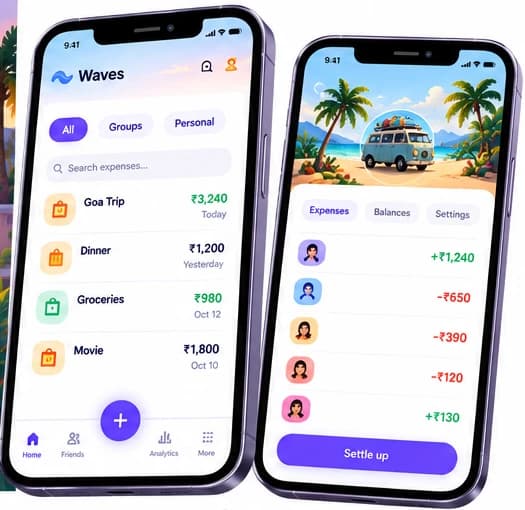
No daily limits
Split as much as you want
COMPARISON
Compare the features, free plans and ways to settle.
Waves
Your shared expenses, together.
Splitwise
Compared from public sources.
| Feature | Waves | Splitwise |
|---|---|---|
| Free plan limits | No limit on people, expenses, currencies or splits. First group free; extra groups cost 6 credits on Free | A daily limit on new expenses (exact count not verified); Pro removes it |
| Price | Free forever. Pro is ₹79/month or ₹699/year in India; other countries priced in the app store | Pro is a paid subscription; store prices vary by country |
| Ads | Free is ad-supported: watch a short ad to earn credits. Pro: no ads | Pro is described as ad-free |
| Works offline | ✓ | Yes, offline mode with cloud sync |
| Multi-currency | Every ISO 4217 currency, free. Fix the rate per bill, person or trip | 100+ currencies; automatic conversion is Pro |
| Receipt scanning | Yes: 2 credits a scan on Free, 300 scans a month on Pro | Pro only |
| Voice entry | English, Hindi, Tamil, Arabic and Hinglish: 1 credit per AI command on Free, 100 a month on Pro | Not listed |
| UPI hand-off | Opens your UPI app with the exact amount. For PayPal it opens a payment link; for Venmo, PayNow, Pix and others it shows the payee details to copy. Waves never holds money | Not listed |
| Data export | JSON, CSV and PDF. On Free an export costs 6 credits | CSV; JSON backup on Pro |
| Languages | English, Hindi, Tamil and Arabic (right to left) | 12 on iOS, no Indian language listed |
| Platforms | Android, iOS and web, plus Apple Watch and home-screen widgets | iOS, Android and web |
| Family splits | Yes: split by family with per-family amounts | Not listed |
Competitor details from their public sites and app-store listings as of 25 October 2026; trademarks belong to their owners. "Not listed" means we did not find it in the sources we checked, not that it is missing. Plans and prices change, so check their site before you decide.
Last checked October 2026. Scroll horizontally on smaller screens to compare all columns.
People, expenses and currencies are unlimited on Waves Free.
Explore the comparisonWaves opens your UPI app with the exact amount. Waves never holds money.
See how settling worksImport a Splitwise CSV via Settings > Your data > Import from Splitwise. Review the preview and check your balances.
See the move guideMove from Splitwise to Waves
In Splitwise, export the group you want to bring over as a CSV file (see Splitwise help for where the export lives).
In Waves, open Settings, then Your data, then Import from Splitwise, and pick the file.
Match each name in the file to a person in Waves. The preview shows what will be created before anything is saved.
Check the balances. They carry over to the paisa. Splitwise files do not record who paid on each row, so Waves reconstructs the payer and tells you so in the preview.
Ready for your next shared expense?
Keep your groups, expenses and balances together.
Add as many expenses as the day needs. People, expenses and currencies are unlimited on Waves Free.
Currency handling is free, and Free scans receipts for 2 credits each. On Splitwise, scanning and automatic conversion sit behind Pro.
Waves opens your UPI app with the exact amount, and understands "Ravi ne 300 diye chai ke liye" in Hindi, Tamil, Arabic or Hinglish.
Free is ad-supported: you choose when to watch a short ad, and it earns credits for scans and voice commands. Ads never appear on balances, groups or settling up.
People look for a Splitwise alternative when the free plan's daily expense limit gets in the way, when ads or paywalled scanning bother them, or when the group needs UPI and Indian languages. Here is how Waves compares, and where Splitwise is still the better pick.
Splitwise is a widely used expense splitter, with about 29K ratings on the iOS App Store. Its free plan has a daily limit on new expenses, and scanning and currency conversion are on Pro.
Waves keeps people, expenses and currencies unlimited on Free, includes export, works offline first, and adds UPI hand-off and Indian-language voice entry. It is newer and smaller.
Your friends may already have Splitwise. Waves is newer and smaller, so expect a shorter track record.
Splitwise Pro can import card transactions in the US. Waves has no bank or card feed.
Its app lists 12 languages. Waves has four: English, Hindi, Tamil and Arabic.
If you want unlimited expenses on a free plan, offline-first entry, UPI hand-off and Indian-language voice, Waves is worth trying. If your group already lives in Splitwise and nobody wants to move, staying is a fair choice.
Yes. Export your Splitwise group as a CSV and use Import from Splitwise under Settings, Your data. Balances carry over; the payer on each row is reconstructed because Splitwise files do not record it, and Waves tells you that in the preview.
No. People, expenses and currencies are unlimited on Free. Credits cover AI voice (1), receipt scans (2), exports (6) and extra groups (6; the first group is free). Pro is ad-free with 100 AI voice commands and 300 scans a month.
No. Anyone can open a Waves group from a link or QR code in a browser without an account, though guest access is limited in time.
Waves Pro is ₹79 a month or ₹699 a year in India, and other countries are priced by the app stores. Splitwise Pro prices vary by country in the app stores, so compare the price your store shows.
Free is ad-supported: you choose to watch a short ad, which earns 6 credits for scans, voice and exports. Pro has no ads.
Competitor details from their public sites and app-store listings as of 25 October 2026; trademarks belong to their owners. "Not listed" means we did not find it in the sources we checked, not that it is missing. Plans and prices change, so check their site before you decide.
Waves details: free plan and Pro features as described in the app and on this site; Pro-only items are marked. See something out of date? Write to hello@wavs.co.in.
Start free today. No credit card required.