Expenses made simple
Split, track and settle together
Waves helps you manage shared expenses with friends, family or anyone. Simple, beautiful and built for real life.
- Coming soonApp Store
- GET IT ONGoogle Play
- New accounts get 15 days of Pro free
- No credit card required
- Works offline

Scan bills
Add expenses in seconds

Split with anyone
Friends, family or roommates

Track spending
See where your money goes

Manage groups
Trips, home, dining and more

Your data stays yours
Private, secure and never sold
How it works
Three simple steps
From an expense to a settled balance, in less than a minute.
- 1
Add an expense
Type it, scan a receipt or just say it.

- 2
Split with people
Choose who paid and how to split.

- 3
Track and settle
See balances and settle up anytime.

Your money in one place
Simple.Clear.Beautiful.
See expenses, balances and settlements at a glance — across all your groups.
Explore all features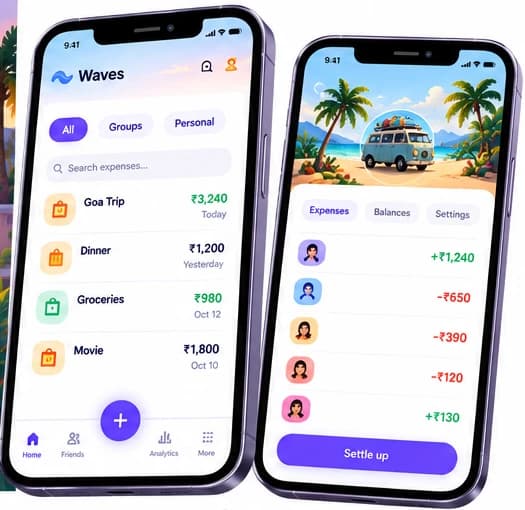
Built for real life
Works for all your moments

Trips & vacations
Keep everyone's travel expenses in one place.

Dining out
Split bills with friends easily.

Home & roommates
Track shared household expenses.

Personal finance
Keep your own spending in view too.
Works offline
No signal? Keep splitting.
Every expense is saved on your phone first, so Waves never waits for the network. Add it, see it, carry on. When you are back online, it syncs by itself and everyone’s balance catches up.
- On a flightSplit the snacks and the cab to the airport before you land.
- A mountain homestayLog dinner and firewood where the signal ends.
- A basement caféAdd the bill at the table, not later from memory.
Manali trip
- Homestay dinnerYou paid · 4 people₹1,800Waiting
- FirewoodYou paid · 4 people₹300Waiting
- TeaYou paid · 4 people₹120Waiting
What happens behind the scenes
- Saved on your phone first, then sent in order. Nothing is dropped, and a retry never counts twice.
- If the server refuses a change, it stays on your screen with Try again or Discard.
- Receipt photos wait in a queue and upload when you are online.
- Choose to sync on Wi‑Fi only, mobile data, or both.
Voice works offline too
Download a speech language once in Offline voice settings and the mic works with no connection. Basic voice runs on your phone; whether a language is available offline depends on your phone’s speech service.
AI voice
Just say it. Waves does the rest.
Hold the mic and speak the way you talk. Waves works out the amount, who paid and who it is split with, then shows it as a card for you to confirm. Speak in English, Hindi, Tamil or Arabic, or mix them.
Understands
- English
- हिन्दी
- தமிழ்
- العربية
- Hinglish
AI voice on every plan, with more commands on Pro.
- You sayEnglish
“Dinner 1,200 split with Ravi and Priya”
Waves does
Dinner₹1,200- You paid
- 3 people · ₹400 each
- You sayHinglish
“Ravi ne 300 diye chai ke liye”
Waves does
Chai₹300- Ravi paid
- Split equally
- You sayதமிழ்
“டாக்ஸி 480 ரூபாய், ரவி கொடுத்தார், எல்லோரும் சமமாகப் பிரி”
Waves does
Taxi₹480- Ravi paid
- Goa Trip · 4 people · ₹120 each
- You sayالعربية
“عشاء 450 درهم، دفعت أنا، قسّم مع سارة”
Waves does
DinnerAED 450- You paid
- 2 people · AED 225 each
- You sayEnglish
“Groceries 850, I paid, split with flat”
Waves does
Groceries₹850- You paid
- Flat 4B · 5 people · ₹170 each
- You sayहिन्दी
“कॉफ़ी 180, सिर्फ़ मेरे लिए”
Waves does
Coffee₹180- Personal expense
- Not split
Not sure? It asks, it never guesses.
- “Lunch 600 with Ravi”
- Which group: Goa Trip or Flat 4B?
- “Goa Trip”
- Lunch · ₹600 added to Goa Trip
- You see what it heard and confirm before anything is saved.
- Names are matched to your groups and members. If a name fits nobody, it asks.
- Other currencies work too: say “40 dirhams” and it keeps the amount in that currency.
- Basic voice runs on your phone for everyone, even offline.
Watch and widgets
On your wrist and your home screen
Add an expense without taking your phone out. Speak or dial it on your watch, or tap a Waves widget on your home screen to jump straight into adding one. The watch hands everything to your phone, so your ledger stays in one place.
- Apple WatchAvailable
- iPhone widgetsAvailable
- Android widgetsAvailable
- Wear OSComing soon
Home, a voice add and the recent list on Apple Watch.
Three widgets: Add expense, What did you spend on? and the action grid.
Screens are drawn from the app and are shown in English.
What you can do
- Watch
Say it to your wrist
Open Speak and say “Auto 120”. The watch sends the clip to your phone and shows “Added ₹120 · Auto”. It lands in your captures, ready to put in a group.
- Watch
Dial it in
No time to talk? Turn the Digital Crown to the amount and tap Add. On Wear OS you use plus and minus buttons.
- Watch
See what you just added
Recent lists your latest expenses with the amount and when, right on the watch.
- Widgets
Start from the home screen
Tap Food on the “What did you spend on?” widget and quick add opens with Food already chosen. The mic and photo buttons jump straight to voice and receipt photos.
- The watch only sends and shows. Every expense is written by your phone, through the same offline queue as the app.
- Out of reach of your phone? The watch says “Queued” and adds it when your phone is near.
- A voice add that needs a decision, like a split or someone else paying, is saved for review instead of guessed.
- The widgets are shortcuts. They do not show balances, and they work with the app’s own screens.
Wear OS is on its way and not released yet.
Works with your AI assistant
Ask your assistant. Waves keeps the books.
Waves speaks MCP, the open standard that lets AI assistants work with the apps you use. Connect one, and talk to your shared ledger in plain language.
Ask, and watch it happen
- Who owes me in Goa Trip?
You are owed ₹2,000 in Goa Trip.
- Ravi₹1,200
- Priya₹800
Uses
get_balances - Add ₹2,400 cab to Goa Trip, split equally
Added Cab · ₹2,400 to Goa Trip, paid by you.
- 4 people₹600 each
Uses
list_membersadd_expense - Settle up with Arjun
You owe Arjun ₹1,350. Recorded, and pending until Arjun confirms. Open the link to pay in your own UPI app.
upi://pay?pa=arjun@okaxis&pn=Arjun&am=1350.00&cu=INR
Uses
settlement_planrecord_settlementpayment_link - Make a group called Manali with Ravi, Priya and Meera, and give me the invite link
Created Manali with you and 3 others. The invite link is ready to share.
Uses
create_groupadd_peopleinvite_link - The cab was ₹2,600, not ₹2,400
Updated Cab to ₹2,600. Each share is now ₹650, and the old version stays in the history.
Uses
list_expensesedit_expense - What did you change in my groups today?
Two things today, both by your assistant.
- AddedCab · ₹2,400
- CreatedManali
Uses
list_agent_writes
You stay in control
- You approve each connection with a Waves sign-in.
- It sees only your own groups, as the app does.
- It can never move money. Paying stays in your bank app.
- Disconnect from your assistant whenever you like.
Choose your plan
Simple pricing for real people
Free
Everything that matters, forever
₹0/month
- Unlimited people, expenses, currencies and splits
- Settle up is unlimited
- Watch a short ad for 6 credits; hold up to 30
- AI voice 1 credit · receipt scan 2 · export 6 · extra group 6 (first group free)
ProRecommended
Everything you need
₹79/month
- No ads
- 100 AI voice commands a month
- 300 receipt scans a month
- Use on up to 3 devices
Free is ad-supported: watch a short ad whenever you like and each one gives 6 credits (hold up to 30). AI voice costs 1 credit, a receipt scan 2, an export 6 and an extra group 6; your first group is free. People, expenses, currencies, splits and settling up are unlimited, with no card at sign-up. Pro has no ads. Prices shown are for India. In other countries the app store shows your local price. Subscribe from inside the app. New accounts get 15 days of Pro free, no card needed.
Your data, always yours
Private, secure and never sold.
Your data belongs to you. We never sell your data. Free is ad-supported: you choose to watch a short ad for credits, and ads never appear on your money screens. Pro has none.
- Private by default
- Encrypted on your device
- You own your data
Common questions
Frequently asked questions
Is Waves really free?
Yes. People, expenses, currencies, splits, offline use and settling up are unlimited on the free plan, and your first group is free. A few things cost credits, which you earn by watching a short ad. The free plan never expires, and new accounts also get 15 days of Pro free, with no card needed.
What does Pro add?
Pro has no ads and adds 100 AI voice commands and 300 receipt scans a month, with use on up to 3 devices. In India Pro is ₹79 a month or ₹699 a year; other countries are priced in the app store.
Does everyone need to install the app?
No. Share a link or a QR code and people can join and see the group in a browser, with no account and no download. They can create an account later if they want the app, and the ledger follows them.
What do you do with my data?
As little as we can. The ledger on your device is encrypted at rest, receipt photos can stay on your device or in your own cloud storage, and we never sell data. Free is ad-supported: you choose to watch a short ad for credits, never on your money screens; Pro has none. The shared ledger is on our server because that is what lets several phones agree — it is not end-to-end encrypted, and we would rather say so plainly.
Does Waves show ads?
On Free, yes: the way to earn credits is to watch a short ad, which gives you 6 credits (you can hold up to 30). Credits pay for AI voice (1 credit), receipt scans (2), exports (6) and extra groups (6; your first group is free). Nothing is forced, and ads never appear on balances, groups, expenses or settling up. They are non-personalized and we do not track you across apps. Pro has no ads at all.
Can I import or export my data?
Yes. You can export your ledger from the app; on Free an export costs 6 credits. Your data is yours to take with you.
Ready to make money simpler?
Start free today. No credit card required.
- Coming soonApp Store
- GET IT ONGoogle Play